GNU Stow managed my dotfiles for years, and for most of that time it was exactly the right amount of software. Point it at a directory, receive some symlinks, go outside. Lovely.
I wrote about that version in My Dotfiles Setup: A Tale of Two Systems. At the time, one repository plus a shared profile felt like I had finally solved dotfiles forever. Future me had notes.
My repository started with a packages/ directory and a few profiles: one shared layer, one for my Arch desktop, and one for my work Mac. Then I added a Python installer because I kept forgetting the commands. The installer learned how to choose profiles, back up conflicts, verify links, and install packages from separate lists.
Stow was still doing its tiny job perfectly. I had simply built a small configuration manager around it and was pretending I had not.
Then I bought a Windows machine.

My tidy pile of symlinks had developed opinions about operating systems.
Supporting it meant teaching my installer about PowerShell, Windows paths, Winget, Scoop, and a fresh crop of exceptions. I could have kept going, but maintaining a homemade chezmoi with fewer features than chezmoi felt like an odd hobby. I already have enough odd hobbies.
What I wanted from the replacement
I wanted one repository that could prepare all three machines without insisting they were secretly the same computer.
The Arch desktop should get KDE, Bash, Neovim, mpv, and the rest of my Linux clutter. The work Mac needs its own Zsh and Kitty files, Raycast scripts, and local work values that must never enter Git. Windows needs PowerShell, native scripts, and its own package managers. I share a file only after checking that it behaves on both systems. A tidy directory tree is not enough reason.
Package installation also had to be optional and safe to repeat. If an application is already installed, the setup should leave it alone. I also wanted to stay close to normal chezmoi conventions. Future me should not need an archaeological dig to understand why .zshrc exists.
The source layout
Chezmoi normally stores its source checkout in ~/.local/share/chezmoi. I kept the repository readable by putting the managed source under home/ and adding a .chezmoiroot file at the repository root:
1 | .chezmoiroot |
Chezmoi source names look like someone sneezed prefixes onto a filesystem, but the rules click quickly. dot_zshrc.tmpl becomes ~/.zshrc. A private_ prefix controls permissions. A symlink_ prefix creates an actual symlink when I really want one.
Most targets are regular files now. That is a change from Stow, but it is the expected chezmoi model: edit the source with chezmoi edit, inspect the result with chezmoi diff, then apply it to the home directory.
Let the OS choose the profile
My first chezmoi version still carried some baggage from the Stow setup. It asked whether the current machine was a work machine and mixed that answer with operating-system checks. It worked, but workMachine = true was a role wearing a cheap operating-system costume.
The current setup derives exactly one profile during chezmoi init:
1 | macOS -> darwin |
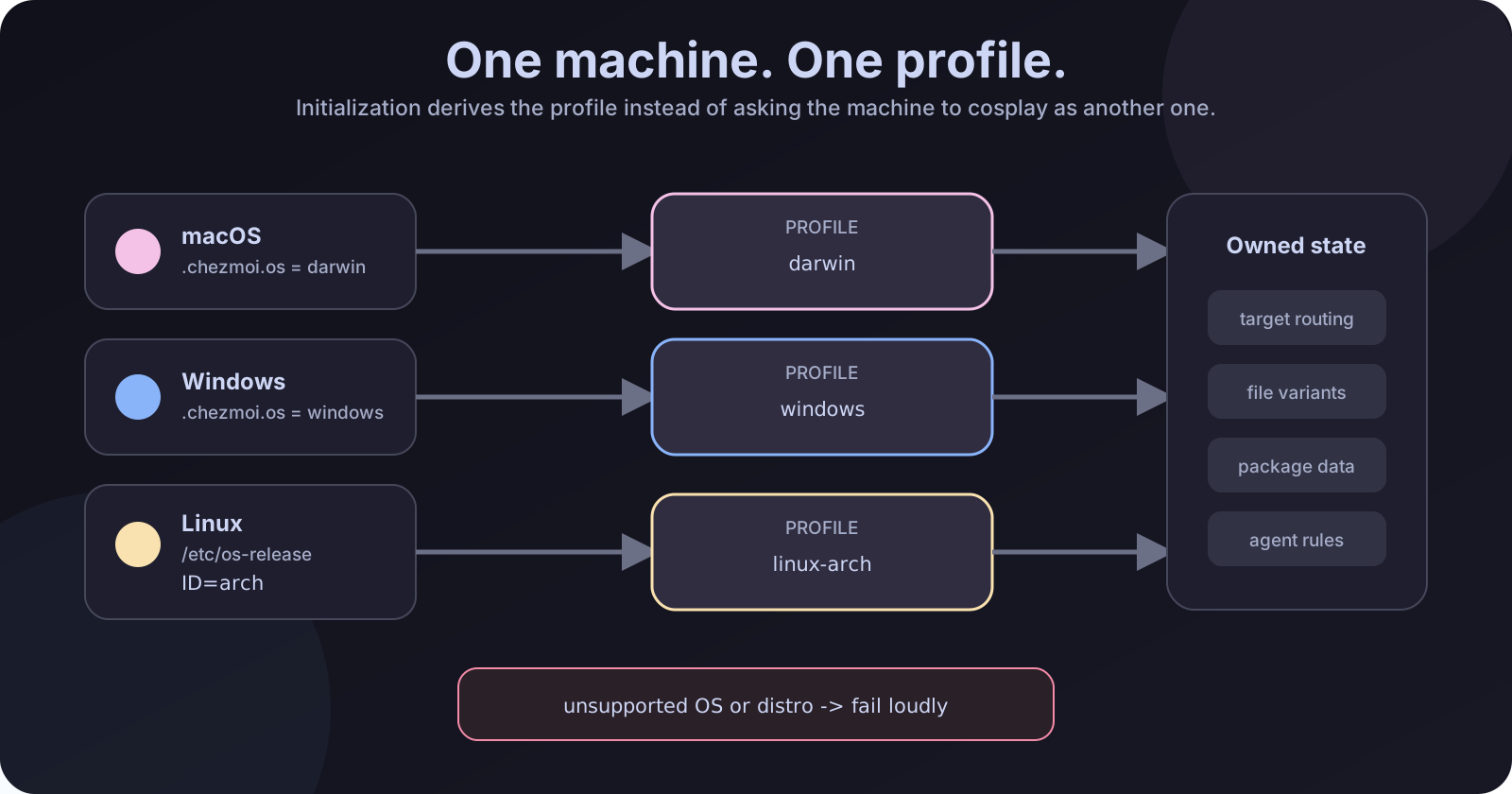
One machine, one profile, and no accidental Arch configuration on Ubuntu.
Unsupported Linux distributions stop during initialization instead of quietly inheriting my Arch configuration. Computers are very good at following bad instructions with confidence, so I try not to give them any.
Only one machine-local question remains:
1 | [data] |
installPackages defaults to false. The work Mac no longer needs a special boolean because darwin is already the work-Mac profile. Employer URLs, repository names, and other local values stay in an untracked ~/.zshrc.work.local file, where they belong.
This refactor also added one small migration step for existing machines. After pulling the new layout, I had to run chezmoi init again so the local config would replace the old OS-and-role data with the derived profile. Then diff, then apply. The migration was boring, which was exactly what I wanted.
Shared on purpose
I did not use the migration as an excuse to squeeze three operating systems into one enormous template. That sort of file begins with good intentions and ends with forty-seven if statements judging your life choices.
The .chezmoiignore.tmpl file acts as an ownership map. Arch owns Linux-specific targets such as .local, .codex, .gemini, Bash, and most of .config. Darwin owns the work-Mac files, including Raycast scripts and its application configuration. Windows owns the PowerShell profile and native scripts.
Files shared by Arch and macOS have one direct source only when their contents are genuinely portable. At the moment that includes Bat, a little Kitty glue, and common interactive Zsh configuration. When a target path is shared but its contents differ substantially, a thin template selects a complete variant from .chezmoitemplates/profiles/<profile>/:
1 | {{- if eq .profile "linux-arch" -}} |
Now I can look at the ignore file to see who owns a target, then open that profile’s complete version. No template spelunking helmet required.
The Windows profile escaped the TODO list
The first version of the profile refactor left Windows empty on purpose. I wanted to build it on the actual machine instead of guessing what Windows-me might enjoy from the comfort of Linux.
That empty profile survived for less than a day.
The Windows profile now receives a PowerShell profile, Windows preferences, setup checks, Raycast commands, and lightweight agent instructions. Its package data includes Winget and Microsoft Store IDs, plus a Scoop list for tools that fit better there. It plugs into the same boundary without making the Unix files pretend to understand drive letters.
Letting chezmoi install applications
Chezmoi can run scripts when their rendered content changes. I use that hook for package installation, which is enough for my bootstrap setup.
Package declarations now live beside their profile:
1 | .chezmoidata/profiles/ |
On Arch, pacman does the work:
1 | sudo pacman -S --needed "${packages[@]}" |
On macOS, Homebrew handles the same job:
1 | brew bundle --no-upgrade --file=/dev/stdin |
Both paths are additive. They install missing entries but do not remove unlisted software or turn setup into an unexpected full-system upgrade.
Windows follows the same idea. A PowerShell template installs exact Winget IDs, handles the Microsoft Store separately, and uses Scoop for its declared packages. It does not remove anything that happens to be absent from the list.
I like this compromise. The repository can make a machine useful, but it does not appoint itself emperor of the operating system.
The migration mistake I nearly shipped
While reviewing the migration guide, I caught a bad instruction.
My first version said to run the old installer to remove the Stow links, then initialize chezmoi:
1 | ./install.sh -p arch-kde unstow all |
One tiny problem: the same change deleted install.sh.
Anyone following the guide after pulling the migration would need a file that had just ceased to exist. The instructions were excellent if you owned a time machine.
The fix was simpler than the workaround. Chezmoi can replace an existing symlink when the desired target is a regular file. I did not need to unstow first. After merging the new layout, I initialized chezmoi, checked the diff, and applied it. The old links briefly pointed at paths removed by the Git update, then chezmoi replaced them with managed files.
The actual flow on Arch became:
1 | sudo pacman -S --needed chezmoi |
I used the SSH URL during the migration because that machine already had GitHub SSH access. It avoided an authentication prompt in the non-interactive session I was using.
What happened to the old links
Before the apply, .zshrc, Kitty, Git, Neovim, and the rest of the managed files were symlinks into ~/Repos/dotfiles/packages/.... Some packages linked individual files; others linked whole directories.
The dry run made the conversion pleasantly unexciting. Chezmoi showed each old symlink being deleted and the matching file or directory being created at the same path. I checked the list for innocent bystanders, then applied it.
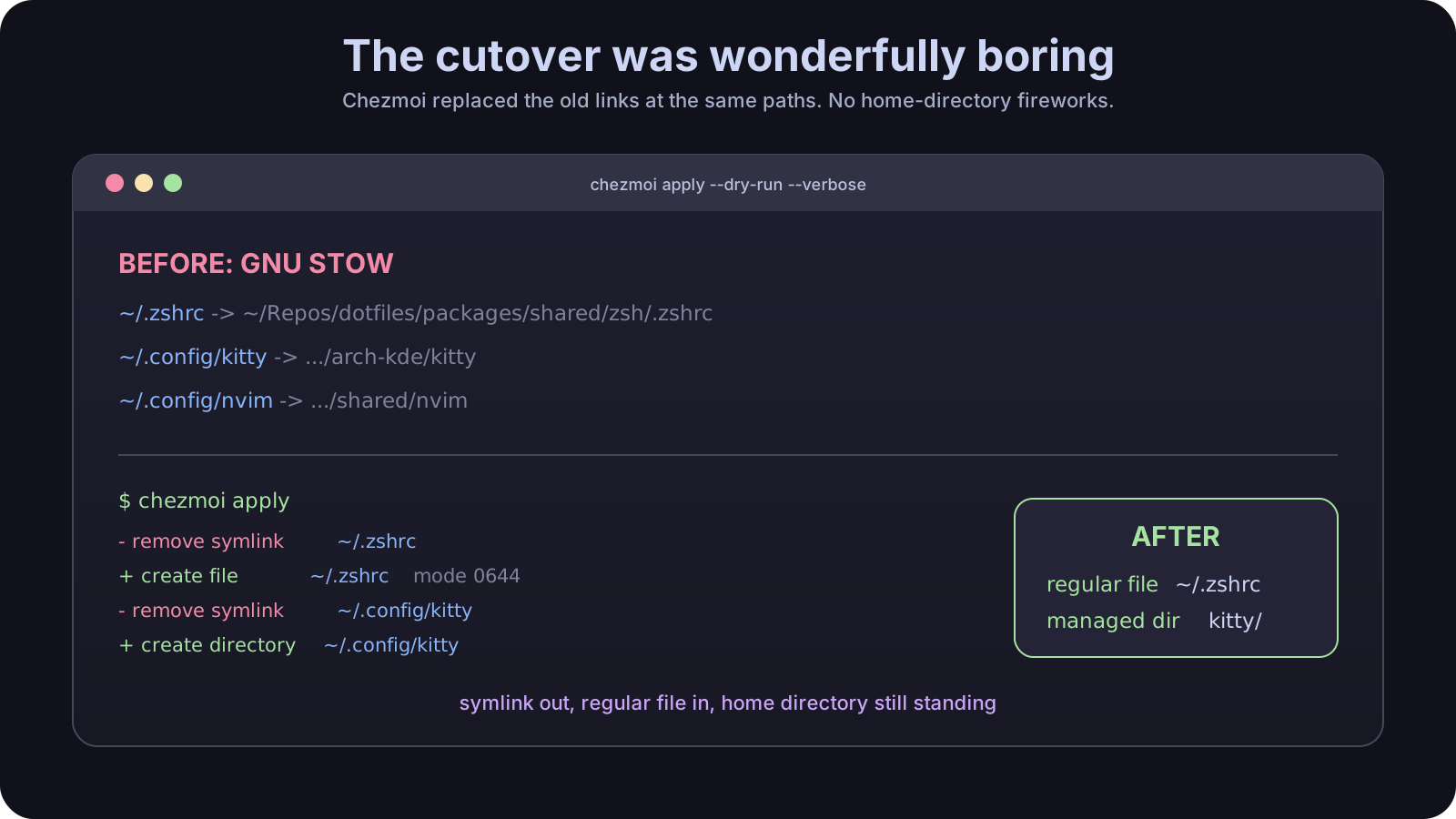
The reassuringly boring part: symlink out, regular file in, home directory still standing.
Afterward:
1 | regular file 644 ~/.zshrc |
One symlink remains on purpose: ~/.codex/AGENTS.md points to ~/.agents/AGENTS.md. Chezmoi manages that relationship too.
The old checkout stayed around long enough for me to verify Zsh and Bash syntax, check the declared packages, and run chezmoi status, diff, and verify. Once those were clean, I moved it to the trash. The live source is now the standard chezmoi checkout:
1 | chezmoi cd |
A small sudo-shaped ending
The configuration migration itself behaved. Package provisioning reached the final three missing Arch packages, then stopped at the sudo password prompt. An automated session should not collect my password, so I reran the file migration with scripts excluded and finished the package step in a normal terminal.
That boundary felt right. I can rerun the command safely, completed work stays completed, and the remaining manual step is obvious. Sudo can keep asking me directly.
Was it worth changing?
For a single Linux machine with a dozen symlinks, I would still recommend Stow. It is small, predictable, and wonderfully boring.
Mine had crossed that line quietly. It had profiles, conflict handling, verification, package provisioning, and a Python installer that was beginning to develop career ambitions. Adding Windows would only make my wrapper more important.
Chezmoi removed code I was responsible for and gave the differences between my machines a proper home. The repository now derives a strict platform profile, rejects unsupported systems, keeps full variants together, and provisions packages through each platform’s native tools.
The result is less clever than my old setup. Good. On the next machine I install chezmoi, initialize the repository, inspect the diff, and apply it. Then I can get on with the important work, such as spending two hours adjusting a terminal theme by one shade of purple.